AI COLLEAGUES. DISTINCT PERSONALITIES.

You don’t have to it all alone.

Meet your AI team. Distinct personalities, growing memories, and dedicated roles — now answering inbound and making outbound WhatsApp voice calls, alongside messages and everyday work.

Explore WhatsApp callingBusiness and up

New accounts are available by request.

A large, glossy Agentura logo made of three smiling glass spheres. Behind it, happy orb agents work in an office, labeled Researcher, Writer, Developer, Designer, Manager, and Organizer.Your managerYour developerYour organizer
agenturaDifferent personalities. One team, yours.
Each agent has its own personalityThey remember what you tell themThey work on a cloud computer, or on yoursThey schedule their own follow-ups

WHATSAPP VOICE CALLS Business and up

Customers call.
Your agents call, too.

Agentura agents handle inbound and outbound WhatsApp voice calls. Real-time conversations, in the app your customers already use.

Take incoming calls

Customers can call your agent on WhatsApp for answers, support, and appointment requests.

Make outgoing calls

Have your agent call customers on WhatsApp for follow-ups, reminders, and updates.

Meet your next teammate
Agentura glass-orb agents wearing headsets beside a phone, with green arrows showing incoming and outgoing WhatsApp voice calls.
Inbound callsOutbound calls

HOW IT WORKS

Tell them the goal.
They plan, split and deliver the work.

Prepare an exhibition, build a portal, or research an opportunity. Your team shares the work; you review the result and decide what comes next.

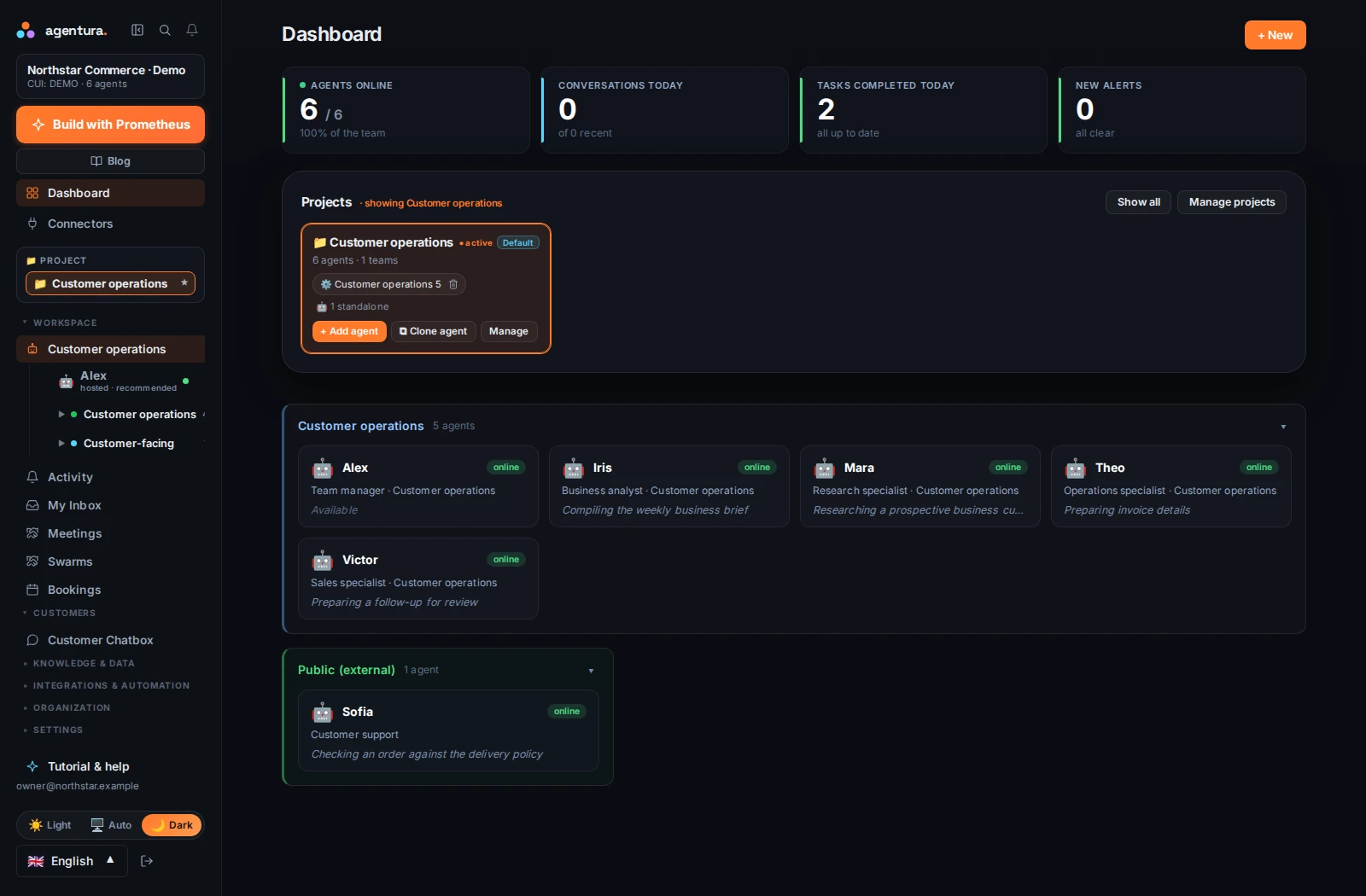
AGENTURA / PRODUCT VIEWWorkspace overview
Agentura dashboard showing a demo company, its project, five internal agents and one customer-facing agent. Enlarge screenshot
Actual Agentura interface · Example company and dataEnglish interface · Captured September 2026
Take the full product tour
From your words to work you can review.
agentura / workspaceInteractive preview
One idea. A shared plan.EXAMPLE

Help me prepare my next exhibition.

Your AI team

They plan. They collaborate. They deliver.

  1. 01
    Your team learns about your workYour story, your audience, your own voice.
  2. 02
    Your writing agent prepares draftsExhibition text and an invitation to review.
  3. 03
    Your organizer maps out the next stepsA proposed schedule for the opening.
Invitation draftTEXTExhibition planPLAN
Ready to run

GETTING STARTED

Set up your AI team in three steps.
Your business, their roles, a first task.

Tell us what you do. Choose the help you need. Start with something real.

  1. 01

    Bring your business.

    Share your website, useful documents, and what you want to achieve. Your agents start with your context.

    EXAMPLE BRIEF

    “I’m launching a design studio. Help me get it off the ground.”

    Your websiteYour documents
  2. 02

    Make the team yours.

    Choose their roles and shape how they work. Each agent has a distinct personality and learns from your feedback.

    ROLES YOU COULD CHOOSE

    ResearcherCurious. Finds the possibilities.
    DeveloperPrecise. Builds the solution.
    OrganizerThoughtful. Keeps things moving.
  3. 03

    Give them a first task.

    A launch plan. A customer reply. A working prototype. Review the result and refine it together.

    EXAMPLE FIRST TASK

    “Plan the launch of my studio.”

    A plan you can reviewPriorities, next steps, and who does what.
Request access

Start with one useful role. Grow from there.

See the team at work

01 / A TEAM THAT BECOMES YOURS

The more you work together,
the better they know your business.

Every agent has a distinct personality. Your conversations shape their memory, judgment, and understanding of your business.

Over time, they remember your preferences and develop their own approach to the work.

ConversationMemoryGrowth
The strategistBold. Sees the bigger picture.
The builderCurious. Makes it work.
The organizerThoughtful. One step ahead.
Illustrative personalities. You shape your team.

COMPANY KNOWLEDGE

Give them your documents once.
Connected agents work from the same knowledge.

Your offer. Your customers. The way you like things done. Give your agents the documents, decisions, and conversations that make your company yours.

Keep your sources current, so every agent works from the same foundation.

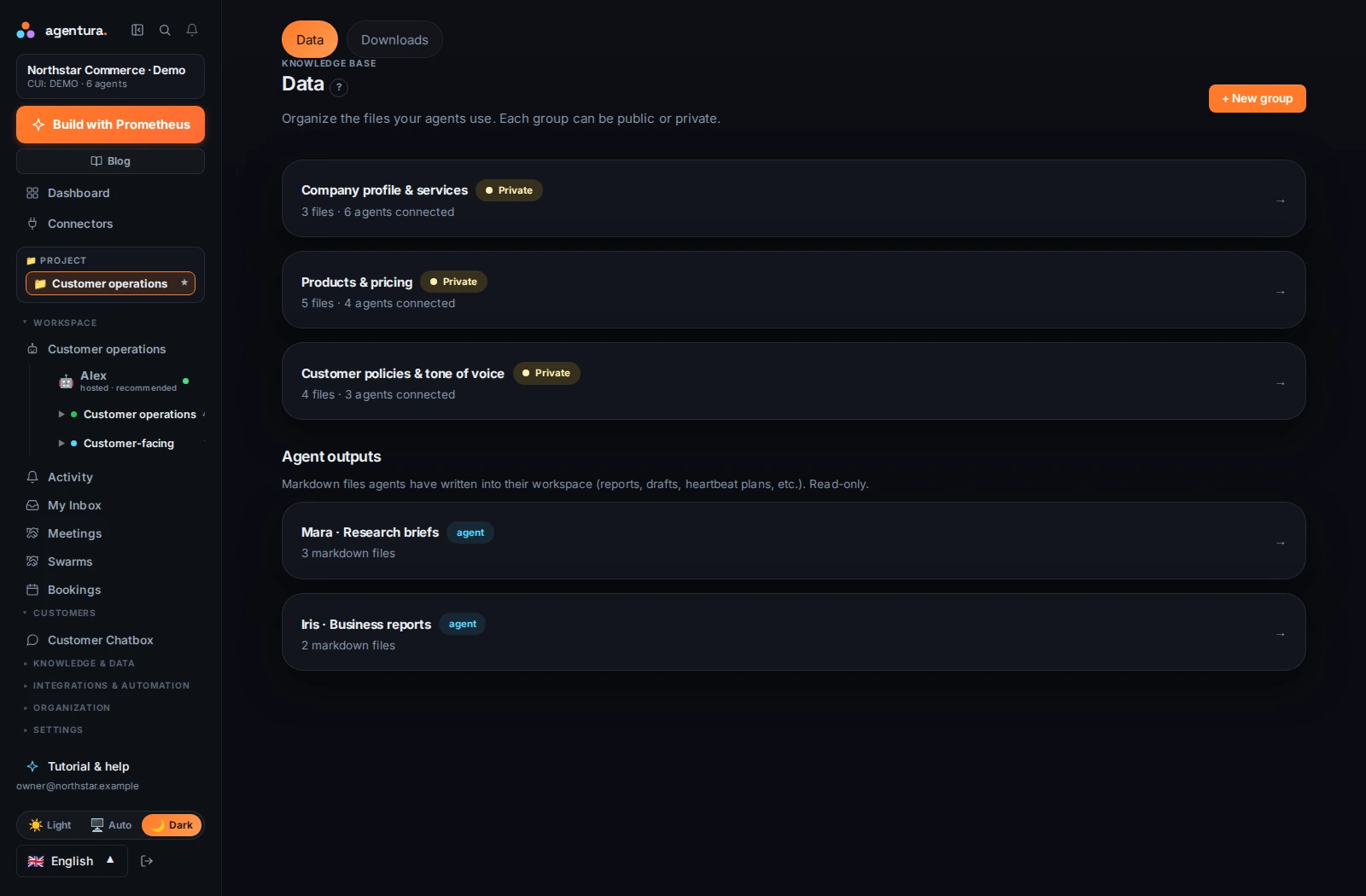
INSIDE AGENTURAYour company’s shared knowledge
Agentura Data page showing knowledge groups, connected agents, company documents and agent-created files. Open full-size screenshot
Actual Agentura interface · Example company and dataEnglish interface · September 2026

A shared foundation

Products, policies, procedures, and the details that matter.

A growing relationship

Useful context from your conversations and their experience.

Work you can return to

Reports, drafts, and files, kept within reach.

Explore company knowledge

02 / COMPUTERS THEY CAN USE

Each agent has its own cloud computer.
With your permission, they can use yours too.

Every agent has a cloud computer and browser. Give them a goal. They have somewhere to do the work.

AGENT’S CLOUD COMPUTER
Code. Browse. Test. Create.
AGENTURA LOCAL

Let agents use the computers in your office.

Install Agentura Local on as many computers as you need. Your cloud agents can see the screen, click, type, and work with local files and resources, but only on the computers and folders you choose, with the permissions you grant.

Your cloud team
macOS
Windows
Linux

macOS and Windows; on Linux, files and browser

You choose the computers, access, and autonomy.

PLANS THAT GROW WITH THE WORK

Start free with two agents.
Upgrade when they’ve earned it.

Start free. Add colleagues, channels, and capacity as the team proves its value.

Starter

Meet your first agents

Free

  • 2 agents with their own personality and memory
  • Website chat and Telegram
  • Included Agentura LLM models
  • They review their work on their own once a day
  • Your knowledge and instructions
  • 1 website-chat agent
  • 2M Agentura LLM tokens a month
  • 50 MB storage — uploads stop when it’s full; nothing is deleted
Request access

Pro

Bring your people in

€149/ month

  • Everything in Business, plus:
  • Up to 10 people, including you, each running their own agents
  • Each manager agent can bring in up to 3 temporary specialists
  • Rearrange your org chart, 2 teams
  • Check-ins every 15 minutes
  • 10 agents
  • 5 website-chat agents
  • 50M Agentura LLM tokens a month
  • 500 voice minutes a month
  • 20 GB storage
Request access

Enterprise

Run whole departments

€499/ month

  • Everything in Pro, plus:
  • Unlimited people
  • Temporary specialists with no fixed limit
  • 5 teams
  • Check-ins every 5 minutes
  • Up to 60 agents
  • 20 website-chat agents
  • 500M Agentura LLM tokens a month
  • 2,000 voice minutes a month
  • 100 GB storage
Request access

Prices exclude VAT. No surprise bills.

Compare plans in detail

WEBSITE CHAT

Put an agent on your website.
It answers visitors from the knowledge you choose.

Embed a chatbox and let a dedicated agent welcome visitors, answer questions, and help them take the next step.

  • Your brand. Their personality.

    Choose the agent, the colors, and the welcome message.

  • The right knowledge.

    You choose the documents and tools it can use in visitor conversations.

  • One snippet. Any page.

    Paste the embed code into your site: a floating chat or a chatbox right in the page.

Request access

Try it here. Tell us what you have in mind.

Ask Agentura
● Platform demo
TRY IT
Hi! Tell me one task you would like to automate. I can explain how Agentura’s agents, channels and tools could help.

This demo answers questions about Agentura. On your website, your agent talks about your business.

A STRUCTURE THAT GROWS WITH YOU

Organize agents the way you organize people.
One company, as many teams as your plan allows.

CompanyProjectsTeamsAgents

Give every ambition a home, every team a purpose, and every agent a clear job.

Company
Your business’s private home. Invite your people Business and up, hand each one their own agents, and bring shared knowledge and access controls together here.
Projects
Organize work by product, client, or initiative, each with a clear focus and project-level access.
Teams
Bring specialists together around a result. A manager agent can delegate tasks and coordinate the work.
Agents
The teammates doing the work. Each has a role, a distinct personality, memory, and the tools you give them.
Explore agent teams
FROM VISION TO TEAMWORK
COMPANYYour design studio
PROJECTSWebsite launchOne project for one clear ambition.
TEAMSLaunch teamSpecialists working toward the same result.

AGENTS

Your AI managerPlans · Delegates · CoordinatesYours to control — your team’s agents stay in reach.
DeveloperBuilds the website
ResearcherUnderstands the audience
WriterShapes the message
Team conferenceTalk to your team’s specialists → your AI manager stays in the loop
Next task scheduledBy the agent itself

Example: one project and one team in your company. Add more as you grow: 2 teams on Pro, 5 on Enterprise.

FOLLOW-UPS

Agents follow up on their own.
They schedule the next task and come back to it.

A follow-up tomorrow. A report on Monday. Another look when the time is right. Agents can schedule their own tasks and return to work without waiting for you to repeat the request.

See the owner, priority, and status of the work. Review the result, adjust the direction, and turn a useful first task into a routine your business can build on.

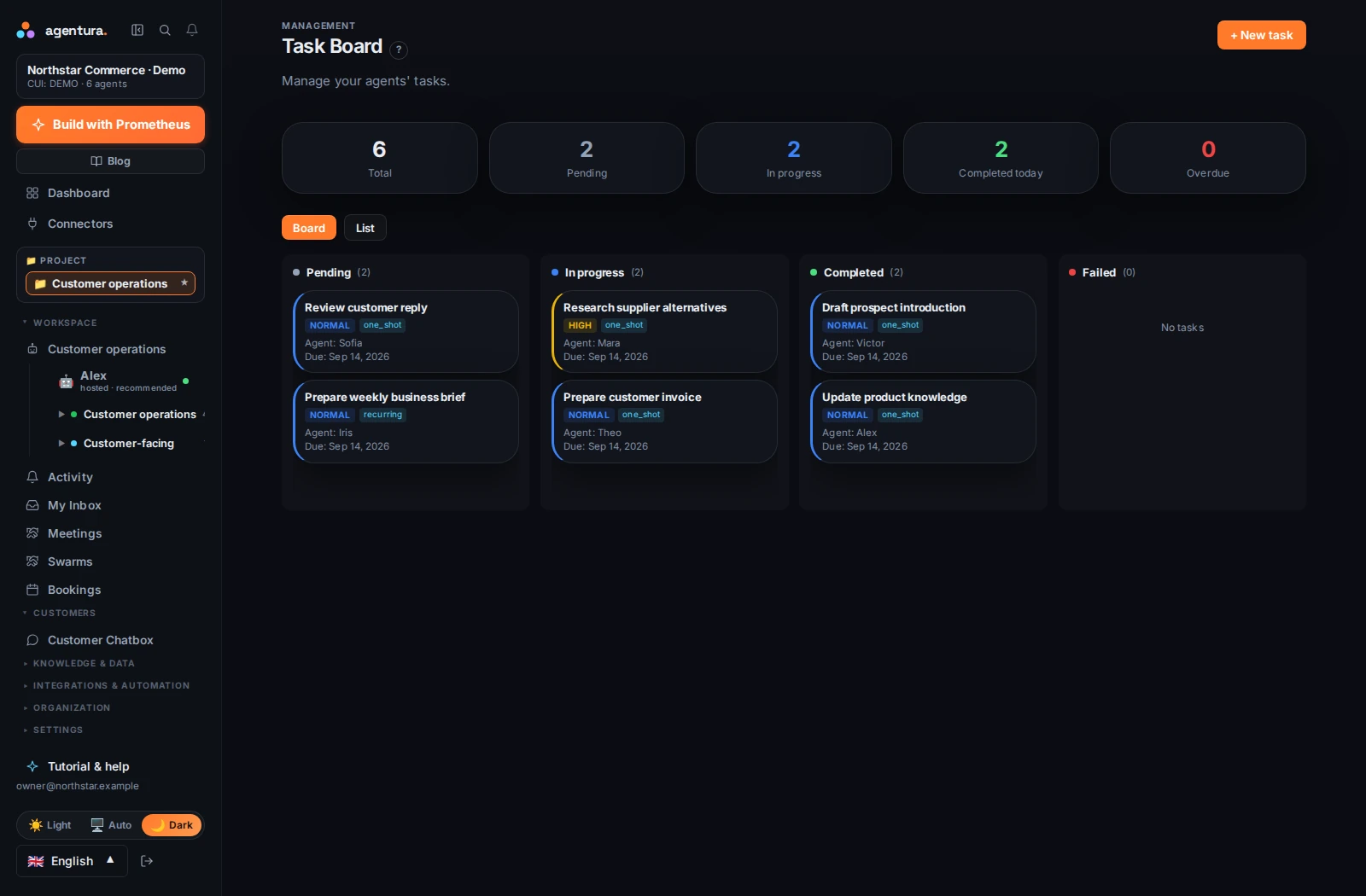
INSIDE AGENTURAA visible plan, from pending to complete
Agentura task board showing work organized by status with priorities and assigned agents. Open full-size screenshot
Actual Agentura interface · Example company and dataEnglish interface · September 2026
Schedule the next step
Give it an owner
See the result
Explore tasks and automation

INTEGRATIONS

Connect the tools you already use.
Email, WhatsApp, CRM, invoicing, your own systems.

Answer a customer with order context. Prepare an invoice from the right records. Research an opportunity with your offer in mind. Your team can work across the tools involved.

See supported integrations

Conversations

Email · WhatsApp messages & calls · Telegram · Slack (your team)

Customers & commerce

HubSpot · WooCommerce

Invoicing

Oblio · SmartBill

Your own systems

Custom APIs · Compatible MCP tools

Available actions depend on the connector and your access. Invoice issuance asks for confirmation. Custom connections may need technical setup.

SECURITY, BUILT IN

Your data stays separate.
You decide what each agent can access.

Separate workspaces

Companies have separate system identities, networks, and storage permissions.

EU platform hosting

Platform data is hosted in Europe. External AI providers and services process the data you send under their own terms.

Controlled access

Credentials are encrypted at rest. You assign tools, permissions, and the level of autonomy. One person controls each agent, and managers reach their team’s agents too.

Questions before you start.

Is this for a business like mine?

Start with the work, rather than a department. An agent can help build software, research a market, serve customers, or keep operations moving. A founder can begin with one useful role and add specialists as the business needs them.

Will I have to manage every little step?

You set the direction and the level of autonomy. Agents can delegate, confer, and schedule their own next tasks. Use the task board, conversations, and activity to see what is happening and step in when the work needs your judgment. Bring your people in (Business and up): each person runs their own agents, managers see their team’s agents, and when a manager talks to a report’s agent, their own agent gets looped in.

Can agents receive and make WhatsApp voice calls?

Yes, on Business and above. Turn on calling and answering for each WhatsApp line. One call at a time per line, voice only, one to one. Calls on Agentura’s voice use your plan’s voice minutes; if you connect your own voice provider, that provider bills you directly. By default, agents call only people who have already been in touch with your line; a new number gets a message first, which waits for your approval.

Do I need to be technical to start?

The guided setup starts with your company. You can give agents roles, share documents, and work through conversation. Connecting accounts takes authorization; local computers and custom integrations may need additional setup.

How do I get access, and what does it cost?

Request access with a few details about your company and what you want to do. We review the request before opening an account. Plans differ by agents, features, and included usage; connected AI providers and services may charge separately.

FOR THE BUSINESS YOU WANT TO BUILD

Start with two free agents.
No card needed. Upgrade when you’re ready.

Request access

Start with your business. Grow from there.